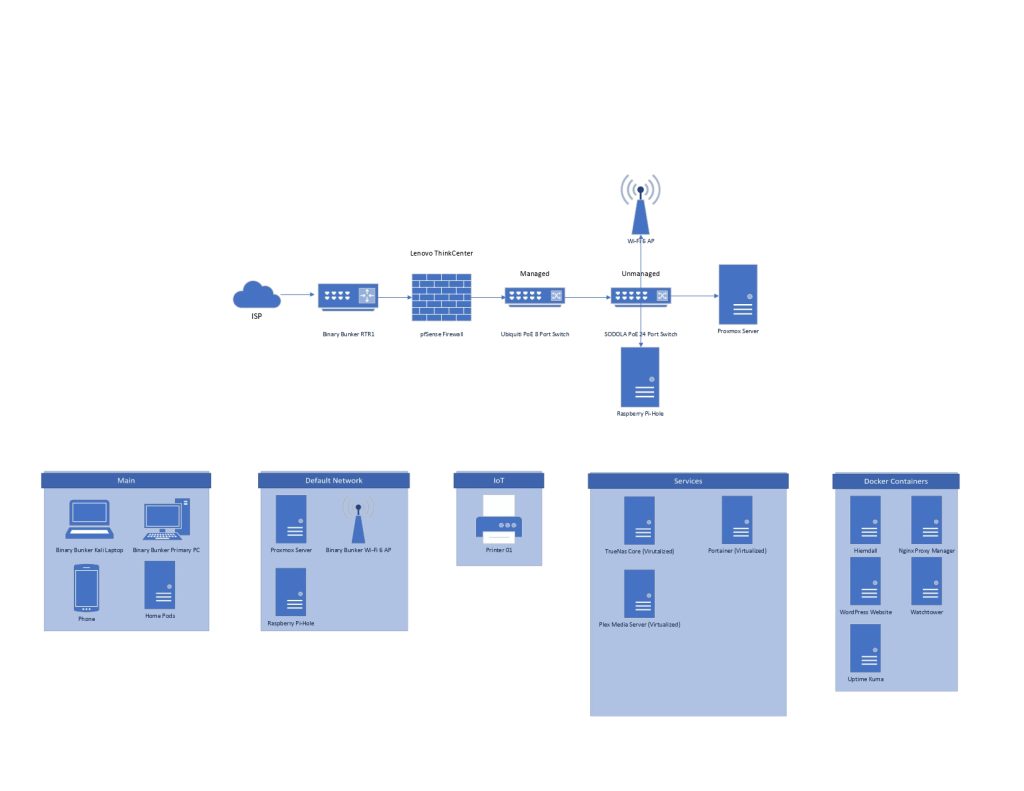
I’ve been building my home lab slowly but surely over the past two years, putting it together piece by piece with equipment that helps further my hands-on experience.
Home Lab version 1.0 is nicknamed The Binary Bunker. This first version of my home lab is built on a budget.
My Home Lab V.1 – The Binary Bunker includes:
- StarTech.com 22U Server Rack Cabinet – Fully Enclosed and on wheels (Model: RK2236BKF)
- StarTech.com 8 Outlet Horizontal 1U PDU (Power Distribution Unit) (Model: RKPW081915)
- StarTech.com 2U Server Rack Shelf 19″ (Model: CABSHELFV)
- Cable Matters Rackmount 1U 24 Keystone Patch Panel
- Cable Matters UL RJ45 Keystones
- Cable Matters HDMI Keystones
- Cable Matters Blank Keystones
- USB 3.0 Keystone Jack Inserts
- SODOLA 24 Port POE Gigabit Managed Switch, 4 Gigabit RJ45/SFP Combo Ports, IEEE 802.3af/at
- Ubiquiti Networks Unfi 8 Port POE Gigabit Managed Switch
- Geeksquad 1285VA Battery Backup with 2 12V 9Ah/20HR Batteries
- Raspberry Pi Zero 2 W (Wireless / Bluetooth) 2021 (RPi Zero 2W) inside a Geekworm Case with an M200-K Gigabit Ethernet Expansion Board 3-Port USB HUB
The primary server I am running has the following specifications:
- 5 TB of HDD storage, with a 128 GB local boot drive. 4 TB is in a Raid 1 Array, mirroring 2TB.
- Motherboard: Gigabyte AM3+ AMD DDR3 1333 760G HDMI USB 3.0 Micro ATX Motherboard GA-78LMT-USB3
- CPU: AMD FX(tm)-6100 Six-Core Processor
- RAM: 24 GB DDR3 1333mhz
- PSU: Antec HCG-750 750w PSU
What is hosted on my server currently? Well, the following is being hosted on it currently.
- Hypervisor: Proxox Virtual Environment
- Storage Array: TrueNAS Core @ 2023 version
- Docker: Portainer Community Edition
- Running inside Docker I have 4 services running.
- Heimdall which is a bookmaker page for server websites.
- Uptime Kuma to notify me on Slack if any of the VMs or other services go down.
- Guacamole is a Remote Desktop Protocol (RDP) service that allows me to remote into any system on my network from anywhere over a browser.
Virtual Machines (VMs) that are running on my server include:
- TrueNas Core
- Windows 10 Machine
- Kali Linux Machine
- Ubuntu Desktop Machine
A Raspberry Pi Zero 2 is running Pi-hole as a whole-home ad blocker.
This website runs on a standalone web server hosted on a Dell OptiPlex 9020M with the following specifications. The site is built on WordPress.
- RAM: 8GB DDR3
- CPU: Intel(R) Celeron(R) CPU G1840 @ 2.80GHz
- Storage: 128 GB Samsung SSD
This home lab V.1 is still an on going learning experience, that is constantly changing and evolving. Any updates I have will be posted.